
diados
Extension of the Day

diados

5.0 FREE
  • Screenshot 1

Description

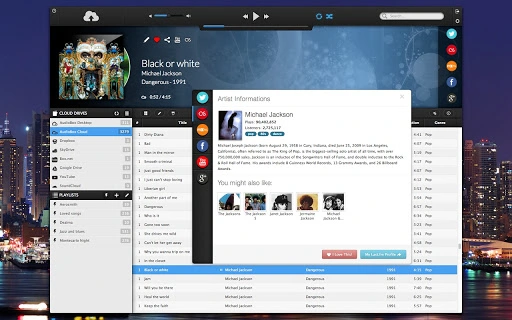
Before install please note:* Plans starts from only $0.99/mo.* The "AudioBox Micro Player" Chrome extension is also available in the Chrome Web Store.Stream your music from Google Drive, Dropbox, Box.net, SoundCloud, SkyDrive!With AudioBox™, the ultimate media platform to store, stream, manage and mix your media files from different cloud sources, your media collection is now truly portable!Upload and stream from the cloud, directly from your desktop, Google Drive or from the other most popular cloud services.Mix your favorite tracks in custom or smart playlists, even if they are stored on different cloud sources.Features:* Unified Library™: use all your cloud services as one.* Google Drive streaming* Retina-ready, pixel perfect.* Pre-buffering, aggressive caching.* Gapless playback.* Offline playlists.* Lyrics integration.* Artwork support,* Share metadata informations.* Now playing/scrobble to Last.fm* Now playing to Facebook* Now playing to Twitch.TV* Lyrics by musiXmatch* AudioBox Cloud streaming* Stream from your own computer via AudioBox Desktop* Dropbox streaming* SkyDrive streaming* SoundCloud streaming* Box.com streaming* YouTube streamingFor more information check out the official website: http://audiobox.fm© 2009-2013 iCoreTech, Inc. AudioBox, Unified Library and the AudioBox logo are trademarks of iCoreTech, Inc. All other trademarks are the property of their respective owners.

Guides & Tutorials for AudioBox App for Chrome

How to install AudioBox App for Chrome
  1. Click the Preview / Download button above.
  2. Once redirected, accept the terms and click Install.
  3. Wait for the AudioBox App for Chrome download to finish on your device.
How to use AudioBox App for Chrome

This software is primarily used for its core features described above. Open the app after installation to explore its capabilities.

User Reviews for AudioBox App for Chrome 0

    No reviews found

Similar Apps


